

Close Menu
Aviation Analysis – Industry Travel NewsAviation Analysis – Industry Travel News
    Facebook X (Twitter) Instagram
    Facebook X (Twitter) Instagram
    Aviation Analysis – Industry Travel NewsAviation Analysis – Industry Travel News
    Subscribe
    • Home
    • Top News
    • World
    • Economy
    • Science
    • Tech
    • Sport
    • Entertainment
    • Contact Form
    Aviation Analysis – Industry Travel NewsAviation Analysis – Industry Travel News
    Home»Tech»macOS Monterey and iOS 15 test the responsiveness of your Internet connection
    Tech

    macOS Monterey and iOS 15 test the responsiveness of your Internet connection

    Theodore MeeksBy Theodore MeeksNovember 16, 2021No Comments2 Mins Read
    Share Facebook Twitter Pinterest LinkedIn Tumblr Email
    Share
    Facebook Twitter LinkedIn Pinterest Email Copy Link

    macOS Monterey and iOS/iPadOS 15 include a new tool for measuring the performance of its Internet connection, whether wired or Wi-Fi. Dedicated network interaction testing can be started mainly for developers by typing the command networkQuality In Terminal on Mac (or man networkQuality to request information). Or by downloading a profile to install on your iOS device (the user guide is available on this support sheet).
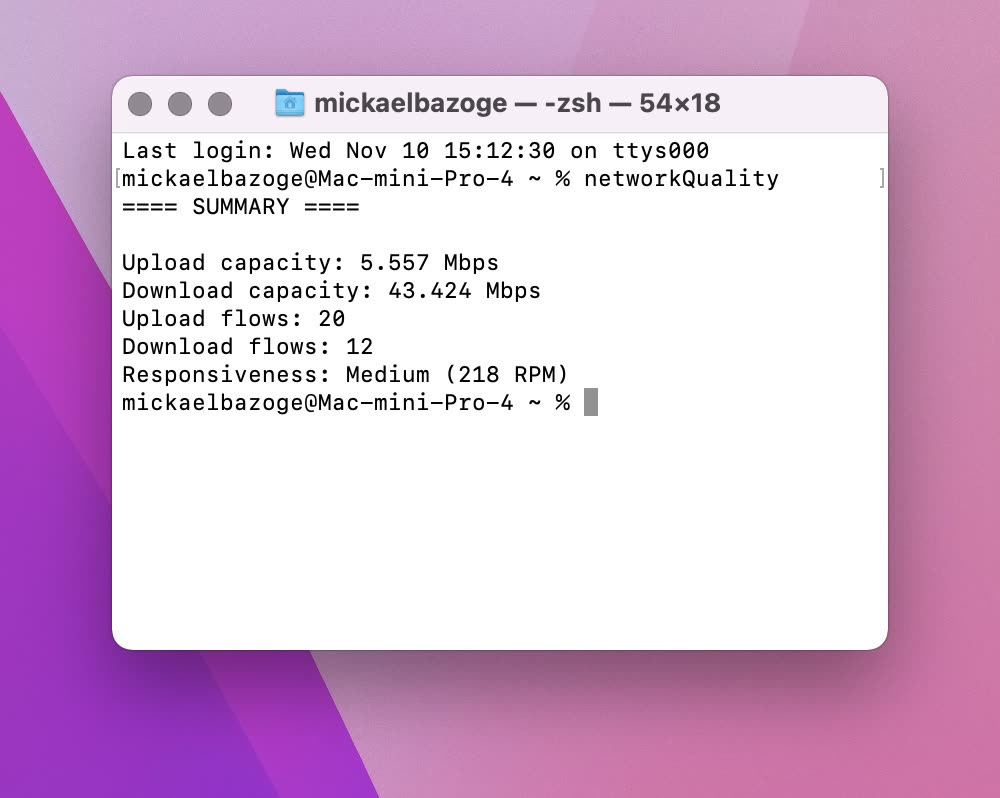
    on macOS Monterey.
    After installing the profile, touch the ℹ next to the network name to test, then the Diagnostics option. Well, the information is not very clear …

    In addition to downloading and uploading results, the Apple Network Test shows a measure of response time in revolutions per minute (RPM), which is the number of transactions your network can process in one minute, under normal operating conditions. The test ranks network RPM performance in three ways: low, medium, and high.

    • Low: For example, if a device on the same network is downloading a movie or backing up its photos to iCloud, the connection in some apps or services may not be reliable, for example when you make video calls using FaceTime or a “game” electronic.
    • Medium: When multiple devices or apps are using the network at the same time, pauses may occur, for example during audio or video calls using FaceTime.
    • High: No matter how many devices and applications are using the network at the same time, applications and services should have a good connection.

    In other words, Apple’s response test is used to evaluate the behavior of a network when it is used by several devices or several services simultaneously. We will want to avoid as much as possible having poor interaction, which means that users of the same network will experience slowness.

    On the contrary, high interactivity will make it possible to benefit from good performance in simultaneous use. Too bad Apple has abandoned the niche of Wi-Fi hotspots, because there is a real need for a simple and effective product to improve network access at home (and not just among developers).

    Share. Facebook Twitter Pinterest LinkedIn Tumblr Email
    Theodore Meeks

    Lifelong foodaholic. Professional twitter expert. Organizer. Award-winning internet geek. Coffee advocate.

    Related Posts

    Neodymium Magnet Uses and Safety Tips for 2025

    October 4, 2025

    Halifax Stanfield Airport Pilots Passenger Service Robots in Bid to Boost Traveler Experience

    August 25, 2025

    Battery miracle in test – HP Omnibook X AI: If it takes longer again

    August 29, 2024
    Navigate
    • Home
    • Top News
    • World
    • Economy
    • Science
    • Tech
    • Sport
    • Entertainment
    • Contact Form
    Pages
    • About Us
    • DMCA
    • Contact Form
    • Privacy Policy
    • Editorial Policy
    STAY UPTODATE

    Get the Latest News With Aviationanalysis.net

    OFFICE

    X. Herald Inc.
    114 5th Ave New York,
    NY 10011, United States

    QUERIES?

    Do you have any queries? Feel free to contact us via our Contact Form

    Visit Our Office

    X. Herald Inc.
    114 5th Ave New York,
    NY 10011, United States

    • About Us
    • DMCA
    • Contact Form
    • Privacy Policy
    • Editorial Policy
    © 2026 ThemeSphere. Designed by ThemeSphere.

    Type above and press Enter to search. Press Esc to cancel.